
Top 5 Ways to Know Your Image Quality Is Scalable for Wall Printing
- Marc Eidelkind

- Feb 24
- 2 min read
When printing large-format graphics with a professional UV wall printer like the NWP GT3200, one of the most common mistakes happens before the printer even moves.
The problem?
Trying to enlarge a low-quality image to wall size.
Not every file is scalable. And if you don’t check first, you’ll end up with:
Blurry edges
Pixelation
Muddy colors
Unprofessional results
Here are the Top 5 ways to know your image quality is truly scalable before committing to a full wall print.
1⃣ Check the DPI at Full Print Size (Not the Original Size)
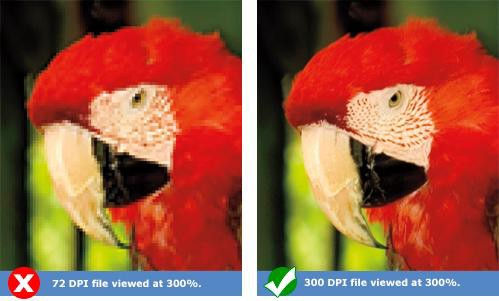

An image might say “300 DPI”… but that doesn’t mean it will print well at 8 feet wide. You must check the resolution at the final print dimensions.
How to test:
Open the file in Photoshop
Go to Image Size
Enter your final wall dimensions
Uncheck “Resample.” Now look at the DPI.
What you want:
100–150 DPI minimum at final size
150+ DPI for high-detail images
Below 72 DPI = visible softness
If the DPI drops too low when scaled up, it’s not truly scalable.
2⃣ Zoom to 200–300% and Inspect for Pixel Breakdown
Your monitor hides flaws at normal zoom. Zoom in aggressively.
If you see:
Square pixel blocks
Jagged curves
Blurry edges
Compression artifacts
Those issues will multiply when printed large.
Rule: If it doesn’t look sharp at 200% on screen, it won’t look sharp on a wall.
3⃣ Identify Vector vs Raster Graphics


Logos and typography should always be vector when possible. Vector files (AI, EPS, SVG):
Scale infinitely
Maintain sharp edges
Print clean at any size Raster files (JPEG, PNG):
Contain fixed pixels
Lose quality when enlarged
If a client sends a screenshot of a logo from a website, that file is likely not scalable.
For professional results using the NWP GT3200 from National Wall Printers, vector artwork is always preferred.
4⃣ Watch for Over-Compression & Social Media Downloads
Images downloaded from:
Instagram
Facebook
Websites
Have usually been compressed multiple times.
Even if the file is large in dimensions, compression can cause:
Color banding
Blotchy gradients
Soft edges
Zoom in and look at gradients and skin tones.
If transitions aren’t smooth on your screen, they won’t magically smooth out on the wall.
5⃣ Print a Small Test Section Before Full Scale

Before committing to a 10-foot wall:
Print a 12” x 12” test section of:
A face
Text
Fine detail
Gradient area
Then step back to the intended viewing distance. This test will tell you:
If detail holds
If colors shift
If texture interferes
This one step protects your ink, time, and reputation.
Bonus Tip: Design for Viewing Distance
A wall graphic is not a phone screen. If the design will be viewed from:
6–10 feet away
You can get away with slightly lower DPI.
If it’s:
Eye-level detail
High-end commercial branding
Close-up photography Higher resolution becomes critical.
Final Thoughts: The Printer Reproduces — It Doesn’t Repair
A professional wall printer like the NWP GT3200 will faithfully reproduce whatever file you feed it.
That means:
Bad files equal bad prints.
Good files get printed beautifully.
Understanding image scalability separates hobby operators from professionals.
If you want consistent, high-end results, image inspection must become part of your standard workflow — before the machine ever turns on.
To Learn more Visit www.nationalwallprinters.com

Comments